Traditional business automation is effective at executing specific, repeatable tasks, but processes involving research, decisions, and interactions with multiple systems are likely to need more flexibility. McKinsey’s 2026 global survey found that 40% of respondents from organizations with more than $1 billion in annual revenue were scaling AI agents, up from 27% the previous year.
At a high level, CrewAI for Business Automation represents an open-source Python framework that enables specialized AI agents to collaborate on complex tasks through CrewAI Crews and CrewAI Flows.
For CXOs and technology leaders, the opportunity is for agents to reduce manual coordination, streamline operations, and build AI agent workflows that deliver tangible business value. But delivering these outcomes requires reliable integrations and an effective implementation approach. Understanding the capabilities of the open-source framework can help technology leaders prioritize the options.
What Is CrewAI for Business Automation?
CrewAI for Business Automation enables businesses to coordinate AI agents using the CrewAI framework. Businesses can assign agents specific roles, goals, and tools for executing a range of activities from research and decision-support to full workflow automation. For instance, AI agents can be configured to perform research activities in support of supplier evaluations.
Unlike traditional automation and rule-driven coding that rely primarily on business logic, CrewAI can be used to coordinate AI agents to implement process-specific analysis and decisions. By combining conventional code, business rules, and approvals, businesses can automate many sophisticated end-to-end processes while still retaining control over mission-critical decisions.
How Does the CrewAI Framework Work?
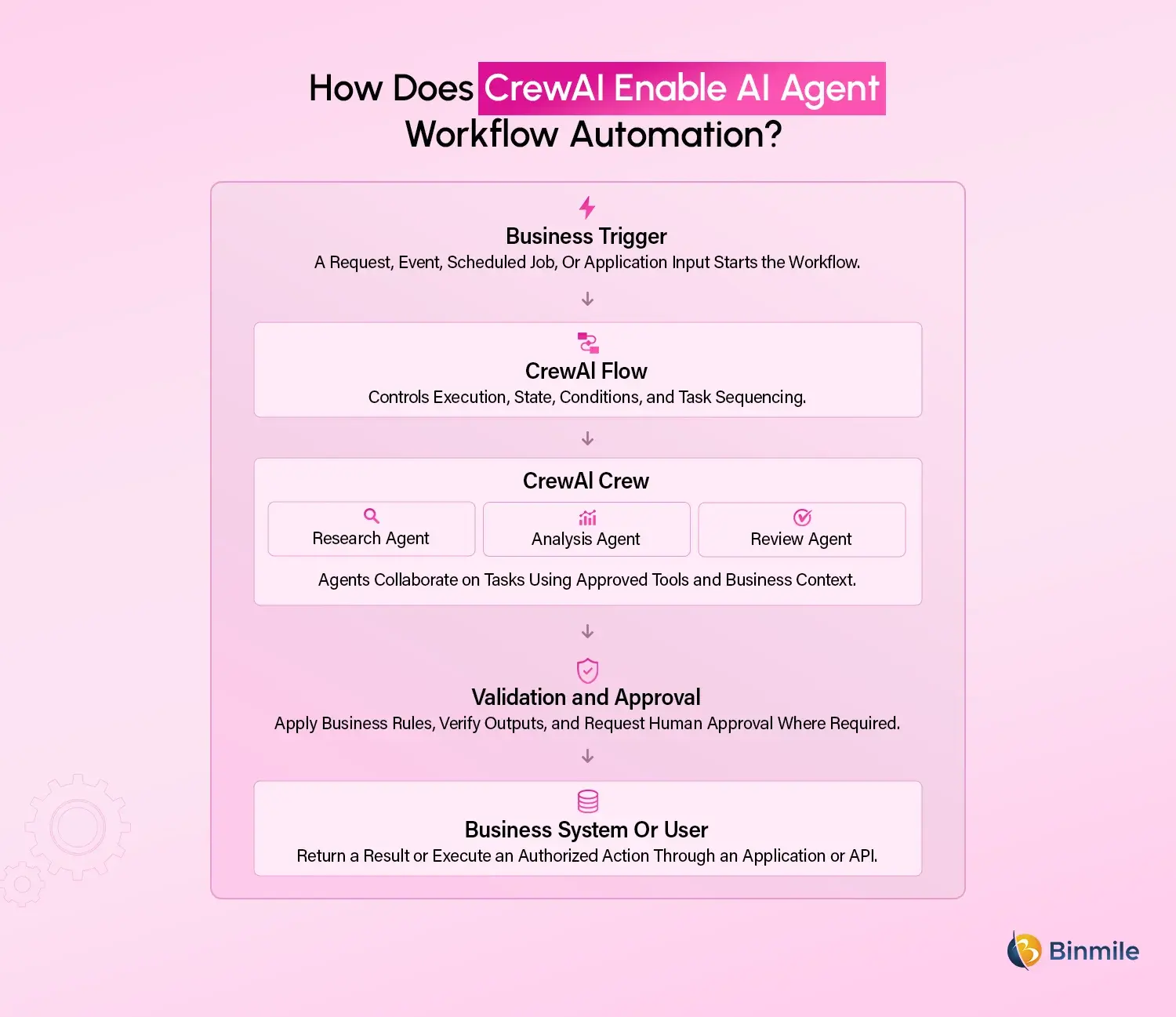
CrewAI for Business Automation works around AI agents, tasks, tools, Crews, and Flows, with each component playing a specific role within an AI workflow automation solution. Businesses can combine CrewAI with GenAI development to build intelligent workflows that connect AI capabilities with existing enterprise systems.
-
AI Agents
AI agents generally have a particular role, goals, and tools to perform specific tasks. In a business context, various AI agents can be organized to execute research, analysis, and review activities. For instance, businesses can define agents to support different aspects of a business investigation.
-
CrewAI Tasks
Tasks provide high-level instructions that describe the contents and the expected outcome to complete specific activities. Tasks also define what, if any, dependencies exist.
-
CrewAI Tools
CrewAI tools represent external connections that provide access to application programming interfaces (APIs), databases, search functions, and business applications. Tools should be configured to only provide access to data and actions required to perform specific tasks.
-
CrewAI Crews
CrewAI Crews combine multiple agents to accomplish specific goals. Agents can be combined in a number of ways ranging from sequential processing to task delegation and hierarchical reporting.
-
CrewAI Flows
Flows define the general execution principles and state transitions to perform tasks. Flows can be used to orchestrate crews to accomplish discrete activities and then apply additional business logic and rules for more complex, multistep processes.
CrewAI Crews vs. CrewAI Flows: What Is the Difference?
Although these components work together, they address different requirements.
| Dimension | CrewAI Crews | CrewAI Flows |
|---|---|---|
| Primary Purpose | Collaborative task execution | Workflow orchestration |
| Best Suited For | Research, analysis, synthesis, and complex tasks | Triggers, state, branching, and predictable process control |
| Execution Approach | Agent-driven collaboration | Explicit application logic and event-driven execution |
| Example | Agents assess supplier risk and summarize findings | Workflow validates inputs, invokes the Crew, and routes results for approval |
| Business Value | Helps automate knowledge-intensive work | Makes the overall process easier to control and integrate |
Practical Considerations
In most cases, it is unlikely that businesses will use the capabilities of either component for every process or activity. For more sophisticated business applications, a Flow can be used to govern the execution of a process, and then invoke a Crew only when it makes sense to take advantage of the autonomous nature of agentic systems. A single Flow might be used to determine the appropriate account information, then invoke a Crew to research and recommend an action to address a customer service request. Before responding to a customer with sensitive information or issuing a refund, the Flow can be used to route the request for approval by an authorized employee.
For complex lines of work that span multiple domains and require extensive research, the combination of a Flow and a Crew can be particularly powerful. In general, Flows are best for predictable automation, while a Crew is best used for work that requires collaborative analysis and synthesis.
What Business Processes Can CrewAI For Business Automate?
The business processes that are best suited for implementation using CrewAI generally involve multi-step activities, making it a practical option for agentic process automation that utilizes multiple information sources and requires analysis, synthesis, and/or decision-making. The focus should be on processes where the introduction of agents can substantially reduce the amount of manual coordination and effort.
-
Sales Operations and Lead Qualification
CrewAI agents can be used to research prospects, analyze lead data and qualification criteria, and prepare sales briefs. These activities can be further governed by a Flow to validate findings and update a customer relationship management (CRM) system, reducing the amount of time that sales representatives spend researching opportunities.
-
Customer Support and Service Operations
CrewAI agents can be used to review customer history, order details, and support policies and prepare customer responses. Similar to sales operations, support and service processes can use Flows to route sensitive or complex requests and approvals to specific employees.
-
Finance and Accounts Payable
CrewAI can be used to extract key details from electronic invoices and compare this information to purchase orders and contracts. Validation and approval workflows governed by a Flow can be applied to identify exceptions, helping finance teams avoid unnecessary payments.
-
Procurement and Supply Chain Management
CrewAI can be used to compare supplier proposals, pricing, risks, and compliance requirements. A Flow can be used to coordinate procurement activities and prepare standardized comparisons for authorized decision-makers.
-
IT Operations and Incident Management
CrewAI agents can be used to summarize log data, classify incidents, search knowledge bases, and recommend remediation steps. Flows can be used to triage incidents based on severity, while changes to production are subject to the appropriate approvals.
-
Software Engineering and AI-Powered Testing
CrewAI agents can be used to analyze requirements documents, prepare test scenarios, evaluate coverage, and summarize defects. Existing AI-powered testing automation frameworks can be used to execute tests, while the Flows manage the execution workflow and collate verifiable test results.
-
Market Research and Business Intelligence
CrewAI can be used to gather and analyze a wide range of market intelligence, competitive activity, customer feedback, and internal data to help prepare executive briefings. Source validation and analyst reviews can help ensure a consistent level of quality and relevance.
What Are the Benefits of CrewAI for Business Automation?
The potential value offered by the CrewAI open-source framework is significant; however, a business has to determine whether its needs and objectives align with the capabilities and limitations of the solution.
-
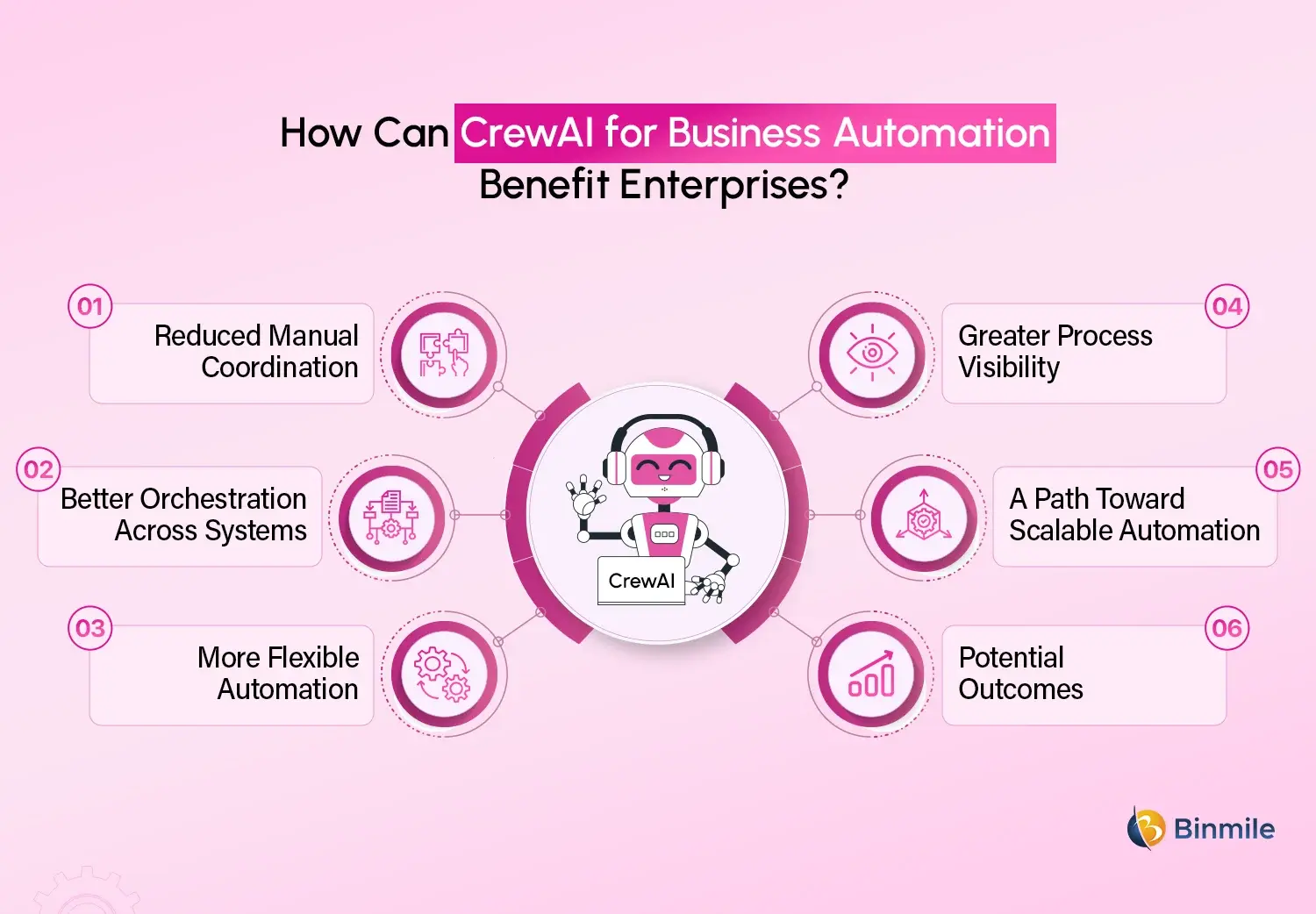
Reduced Manual Coordination
Agents can potentially help reduce the amount of effort and time spent coordinating multiple research, classification, summary, and preparation activities.
-
Better Orchestration Across Systems
CrewAI tools and Flows can be used to connect agent-driven activities with other systems and applications, enabling businesses to extend their existing technology capabilities rather than replace them.
-
More Flexible Automation
Multi-agent workflows can be particularly useful for implementing solutions that require a degree of interpretation.
-
Greater Process Visibility
Processes supported by a structured approach that includes execution, logging, validation, and approval steps contribute to increased visibility and an easier ability to analyze production failures and investigate issues.
-
A Path Toward Scalable Automation
Once a use case has proven itself to be valuable, improvement initiatives can be implemented to refine the links and enhance the execution capacity before adopting similar patterns for other processes.
-
Potential Outcomes
The benefits described above represent potential opportunities; the actual results will be dictated by a range of factors, including the nature of the workflow, model performance, integration capacity, operating costs, and level of human intervention.
How to Build a Production-Ready AI Agent Workflow With CrewAI
A prototype implementation can help demonstrate that agents are capable of performing a particular collaborative task, but a production-ready solution also needs to showcase that it can be reliably executed with real-world activities, data, permissions, exceptions, and performance requirements.
The following considerations should be particularly important to development teams that are building a production-ready AI agent workflow.
Step 1: Select a Business Process With Measurable Outcomes
Identify business process automation such as lead qualification. Determine baseline metrics for time, cost, accuracy, and manual effort to showcase CrewAI’s potential impact.
Step 2: Map the Workflow and Identify Where Agents Add Value
It is important to separate rule-based activities from more complex, multi-step analysis. Wherever possible, rule-based activities should be governed by conventional code, while agentic activities should be handled by agents.
Step 3: Define Agent Roles, Tasks, and Tools
Clearly defined agent responsibilities, instructions, and tools can reduce the risks of poor execution. The use of structured outputs and validation rules should also be considered.
Step 4: Orchestrate Execution With CrewAI Flows
This step is critical to ensuring that the solution can deliver consistent results in production environments. Wherever possible, process execution, state transitions, and validation rules should be explicitly defined within Flows.
Step 5: Integrate With Existing Enterprise Systems
Connect the solution to enterprise resource planning (ERP) and other relevant systems to ensure that data, approvals, and execution are properly secured and only accessible by authorized personnel.
Step 6: Test Failure Scenarios, Not Just Successful Runs
In addition to test automation scenarios, it is important to simulate API failures, incomplete or inaccurate outputs, and repeated attempts to process an identical request.
Step 7: Deploy, Monitor, and Optimize
Monitor and measure the completion of individual tasks, overall workflow execution time, cost, and errors. The performance of individual agents should also be monitored to optimize their role and contribution.
Connect with Binmile to build scalable AI-powered solutions that streamline operations, improve efficiency, and support your business goals.
CrewAI for Business Automation: A Practical Example
Consider a B2B company that receives dozens of inbound sales inquiries on a daily basis. Sales representatives are tasked with reviewing each inquiry, gaining an understanding of the prospect’s business, determining its relevance, and preparing for follow-up.
A CrewAI workflow could be used to support many of the research activities involved in the sales process.
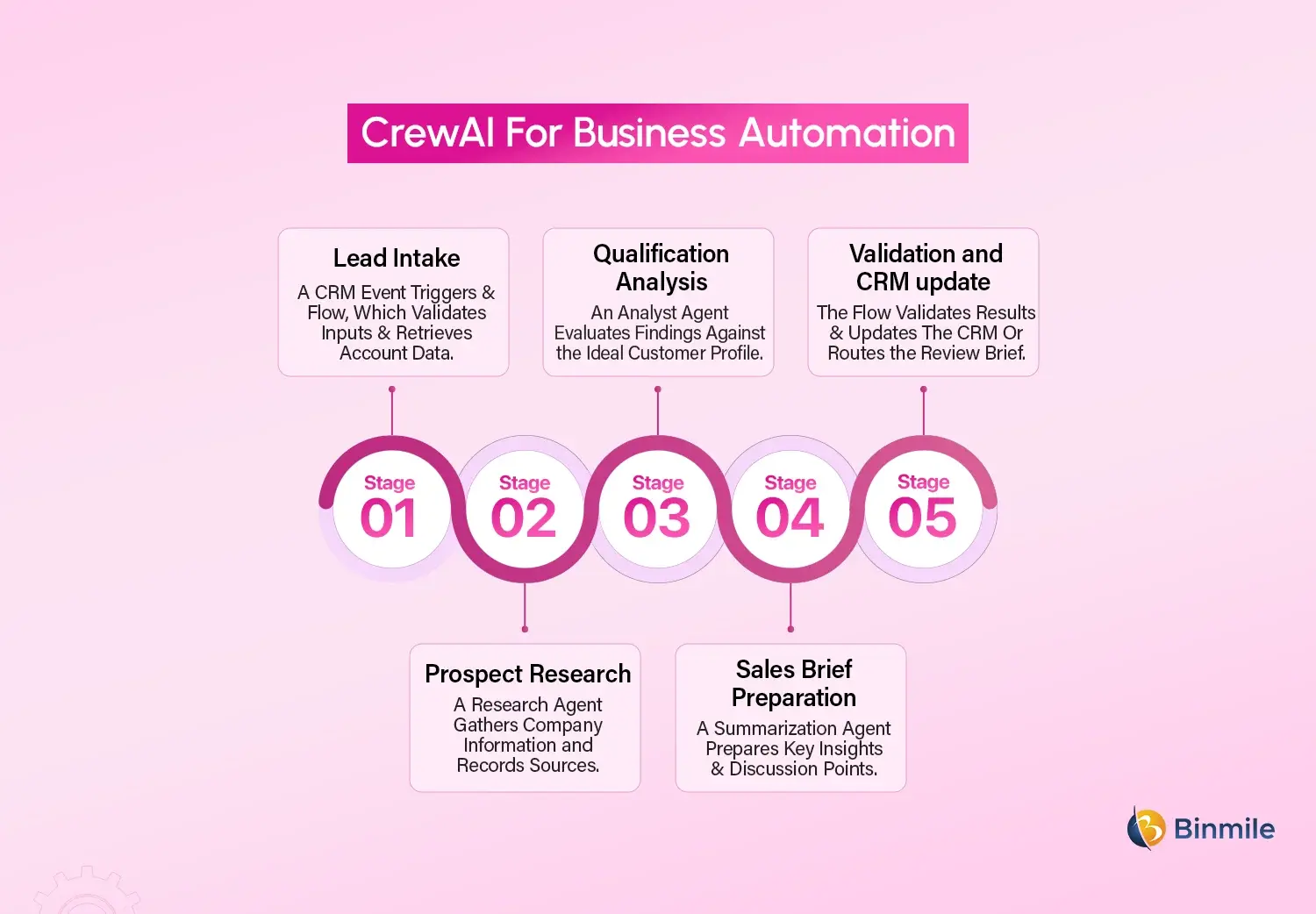
The expected benefit is a reduction in the amount of time spent researching and assembling prospect information. It is important to note that the workflow will not necessarily result in higher conversion rates, which will need to be demonstrated through a controlled pilot.
The business could analyze the solution’s impact based on average research time per lead, brief accuracy, percentage of leads that required manual correction, cost per completed brief, and sales-team adoption. If the workflow proves to be consistently valuable, the same architectural pattern can potentially be applied to account research, renewal preparations, or even customer success operations.
What Challenges Should Businesses Consider Before Implementing CrewAI?
CrewAI can support sophisticated AI workflows, but the introduction of multiple agents also brings a number of additional complexities. Enterprise teams that are considering the implementation of an agentic AI solution should carefully evaluate the following considerations before moving beyond a prototype.
-
Accuracy and Reliability
Agents can produce incorrect or potentially harmful outputs. Businesses should use trusted sources, validation rules, and testing to reduce this risk.
-
Data Security and Access Control
Businesses should ensure that sensitive data is properly secured and only accessible by authorized agents and systems.
-
Workflow Complexity
Solutions that incorporate additional agents can become more expensive, time-consuming, and challenging to debug. Businesses should use simpler automation whenever it is appropriate.
-
Integration and Maintenance
APIs and business rules can change, requiring version control and regression testing. These businesses should define clear ownership and responsibilities.
-
Governance and Human Oversight
Businesses should define which actions can be performed by agents and which require human approval, particularly for sensitive customer actions and financial transactions.
-
Cost and Performance
Businesses should analyze the total cost and execution time of a workflow, making sure that it provides value in terms of reduced time and cost.
For CXOs, the emphasis should be on establishing an efficient operating model for AI agent workflows, rather than focusing on the maximum number of agents deployed.
What Are the CrewAI Best Practices for Enterprise-Scale Automation
A production-ready implementation often involves additional requirements besides simply building a functional solution. As an agentic AI solution, CrewAI also benefits from adhering to established best practices for enterprise-scale software development.
-
Start With a Simple Architecture
Use multiple agents only when they offer clear advantages and value. Simpler architectures are often easier to test, implement, and optimize.
-
Use Flows for Process Control
Wherever practical, business rules, conditional routing, validation, and critical state transitions should be explicitly defined within the CrewAI Flows.
-
Apply Least-Privilege Access
Agents should only have access to tools, data, and functions that are required to complete specific tasks. This reduces potential security risks and unnecessary complexity.
-
Define Structured Outputs
Use structured output definitions, validation rules, and completion criteria to help downstream applications and processes consume the results of agents and ensure consistency.
-
Design for Failures
Timeouts, bounded retries, error handling, duplicate-action prevention, and recovery should be designed into a production-ready implementation. Additionally, this helps mitigate potential API failures, incomplete or incorrect outputs, and interrupted or stalled processes.
-
Maintain Workflow Visibility
Monitor and track execution status, tool responses, errors, and latency. This information can be useful in diagnosing problems. However, businesses should also make sure that sensitive data is not logged or exposed.
-
Include Human Approval
Authorization checks should be incorporated to ensure that sensitive customer actions and financial transactions are approved by appropriate personnel.
-
Evaluate and Improve Continuously
Changes to prompts, models, tools, and business rules should be carefully evaluated using representative data before being deployed into production.
These considerations should help improve maintenance and reduce the risks of multi-agent workflows in enterprise-scale implementations.
How Can Businesses Implement CrewAI for Scalable Automation?
Businesses should identify valuable processes with potential business outcomes, assessing whether the required data, integrations, and access controls are in place. In practical terms, this means a focused Proof of Concept (PoC). This explores how agents can be used to address tasks that require contextual analysis while Flows govern execution and business logic. Evaluate the PoC against the existing process for accuracy, completion time, cost, exception rates, and user adoption before scaling the solution.
Establish a range of additional controls, including security, monitoring, testing, and recovery capabilities, before expanding the workflow to other business functions. Businesses should analyze their existing AI infrastructure and model strategies. Also, application architecture to determine whether the open-source framework can meet their requirements or if they will need additional managed capabilities. Businesses that lack the internal expertise should consider the option of working with an AI development partner to design, integrate, and maintain production-ready workflows.
Looking to automate enterprise workflows with AI agents to explore the right approach for your business?
How Binmile Can Help With AI Agent Workflow Development
Successful implementation of CrewAI represents only one aspect of a broader business automation initiative. The bigger challenge is for organizations to identify suitable processes, integrate agents, establish governance, and demonstrate business value. Binmile’s Artificial Intelligence Development Services can support businesses that are exploring AI-powered applications, agentic AI, GenAI development, and business process automation.
From workflow discovery and solution architecture to AI agent development and enterprise-scale integration testing and deployment, the focus should be on building solutions around real-world requirements. Businesses that are considering AI-powered testing can explore the option of agent-assisted test planning and preparation. Additionally, test case generation and defect analysis, combined with the integration of test automation frameworks.
The focus will be on turning isolated AI experiments into end-to-end workflows that meet the requirements of the organization’s systems, controls, and business priorities.
Frequently Asked Questions
CrewAI for Business Automation uses a Python-based framework to coordinate AI agents that collaborate on business tasks. Agents perform specialized activities using assigned tools, while CrewAI Flows manage execution, state, and conditional logic. Businesses can integrate these workflows with existing applications to automate processes such as lead research, document analysis, support operations, and reporting.
CrewAI can automate workflows by dividing complex processes into specialized tasks, assigning those tasks to AI agents, and coordinating their execution. For example, a workflow might retrieve customer information, analyze a request, prepare a recommendation, validate the output, and route the result for approval. Integrations and business rules determine which actions can be executed automatically.
Common CrewAI use cases include sales lead qualification, customer support assistance, invoice exception analysis, supplier evaluation, market research, IT incident triage, and AI-powered software testing. The best use cases typically involve multiple connected tasks, varied information sources, or contextual analysis. Straightforward, deterministic operations may be better handled by conventional automation.
Start by defining the business objective, process inputs, expected outputs, and performance metrics. Configure agents with specific roles, tasks, and restricted tools, then use CrewAI Flows to manage execution and conditional routing. Integrate trusted business data, test failure scenarios, implement access controls and human approval, and establish monitoring before production deployment.
Businesses should begin with a high-value pilot, assess data and integration readiness, and establish a baseline for cost, speed, and accuracy. After validating the workflow, teams can strengthen monitoring, security, testing, and recovery mechanisms. Scaling should depend on demonstrated business value, reliable execution, and the organization’s ability to maintain and govern its AI workflows.