AI coding is no longer limited to experimentation by individual developers. It is becoming part of how engineering teams write, test, maintain, and modernize software. According to JetBrains’ 2026 research, 90% of developers regularly use at least one AI tool for coding and development at work, while 74% have adopted specialized AI tools for software engineers such as coding assistants, AI-native editors, and coding agents. That adoption signals an important shift for businesses.
For enterprises, however, adoption is not as simple as giving developers access to an AI tool and expecting productivity to improve. The real questions are more practical: Where do AI coding assistants create measurable value? Which development activities should they support? How should organizations evaluate security, code quality, governance, and ROI? And when should a company use an existing AI coding platform versus investing in a more customized solution? This guide explores how AI coding assistants work, their role across the software development lifecycle, enterprise benefits and risks, selection criteria, implementation strategies, and what businesses should consider before making them part of their engineering environment.
What Are AI Coding Assistants and How Are They Changing Software Development?
An AI coding assistant is an AI-powered software tool that helps developers write, understand, test, debug, and improve code. While basic tools focus on code suggestions and completion, advanced AI Code Assistants can understand repository context, generate functions, explain complex code, identify potential issues, create tests, refactor code, and assist with documentation.
This makes them more than a faster autocomplete feature. They act as development companions, much like an AI video platform supports multiple tasks across the creative workflow, helping developers spend less time on repetitive work and more time on architecture, problem-solving, security, and business logic.
Where Can AI Coding Assistants Be Used Across the SDLC?
One of the biggest mistakes organizations make is treating AI coding assistants as tools only for writing code. Their value can extend across the software development lifecycle.
1. Requirements and Technical Planning
Developers and architects can use AI to break technical requirements into smaller development tasks, identify dependencies, generate implementation approaches, and highlight potential edge cases.
This does not replace product managers or architects. Instead, it can reduce the time required to move from a business requirement to a technically actionable plan.
2. Development and Implementation
This is where AI coding tools are most commonly used.
Developers can generate boilerplate code, API endpoints, database queries, UI components, configuration files, and repetitive functions. They can also ask the assistant to explain why a particular implementation works or suggest alternatives.
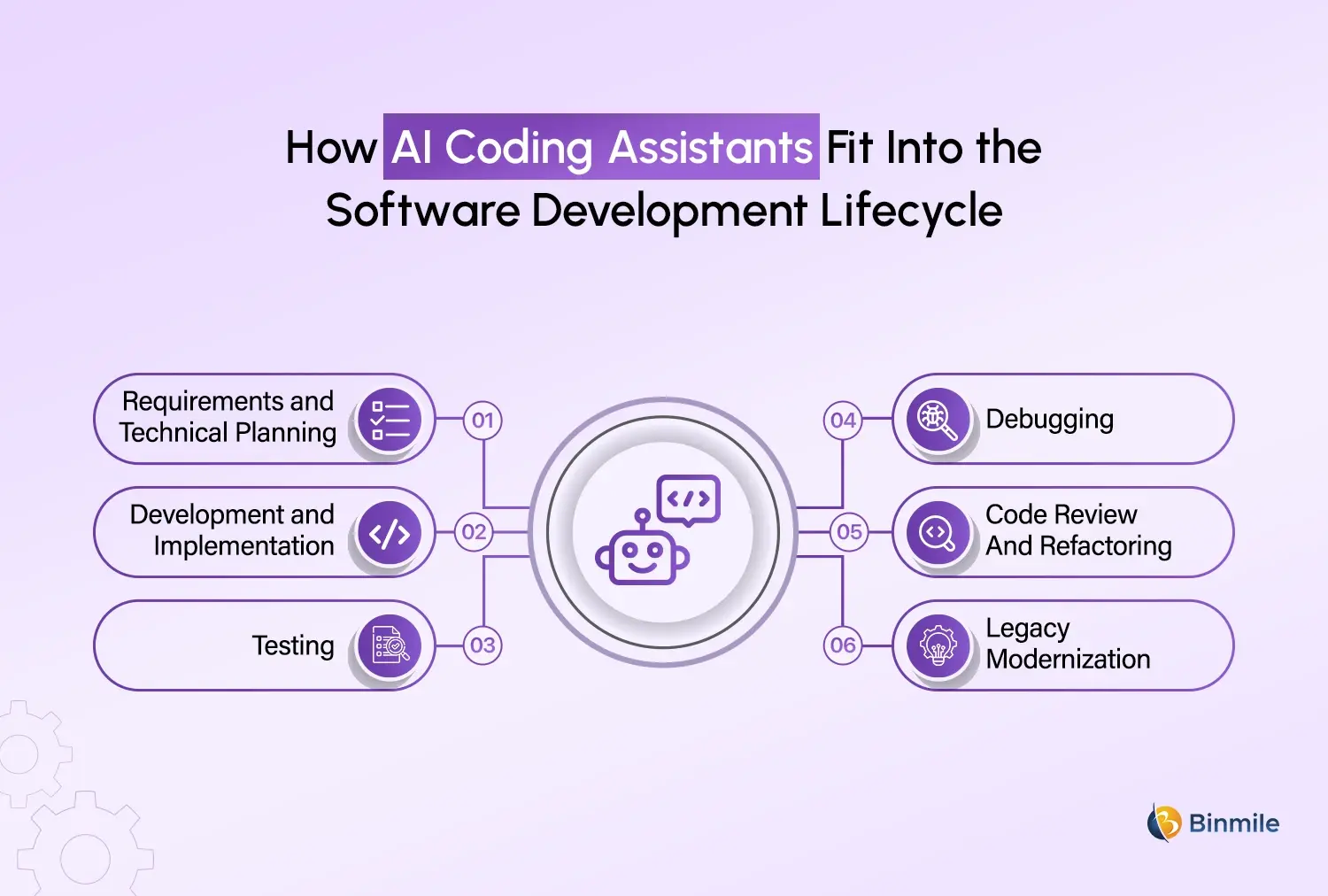
3. Testing
AI can generate unit tests, test data, test scenarios, and edge cases based on existing implementation.
This is particularly useful when developers need to increase test coverage around an existing application without manually writing every test case.
4. Debugging
Instead of searching through documentation or forums for every error, it can provide an error message, relevant code, and surrounding context to an AI assistant development.
The tool can suggest possible causes and fixes. Developers still need to validate those suggestions, but the initial investigation can become considerably faster.
5. Code Review and Refactoring
AI code refactoring can help identify duplicated logic, overly complex functions, inconsistent patterns, and opportunities to improve readability.
Used properly, this can help engineering teams keep large codebases maintainable as they evolve.
6. Legacy Modernization
Legacy systems are often expensive to maintain because they contain outdated languages, frameworks, undocumented business logic, or tightly coupled components.
AI can assist developers in understanding older code, generating documentation, translating portions of code, creating tests around legacy functionality, and preparing modernization candidates.
This is one area where AI-assisted software development can have value beyond developer productivity because it can contribute directly to application modernization initiatives.
Ready to make your engineering teams faster with AI-assisted software development?
What Are the Key Capabilities of AI Coding Assistants
The capabilities available vary considerably between tools. A basic assistant may focus primarily on code completion, while an enterprise-grade platform may support workflows across the software development lifecycle.
| Capability | What It Does | Business Value |
|---|---|---|
| AI Code Completion | Predicts and suggests code while developers type | Reduces repetitive coding effort |
| Code Generation | Creates functions, components, queries, and other code from prompts | Speeds up implementation |
| Code Explanation | Explains unfamiliar code or logic | Reduces onboarding and maintenance time |
| Debugging Assistance | Identifies possible causes and suggests fixes | Helps shorten troubleshooting cycles |
| AI Code Refactoring | Recommends or performs structural improvements | Improves maintainability |
| Test Generation | Creates test cases based on existing code | Improves test coverage |
| Documentation | Generates comments and technical documentation | Reduces documentation overhead |
| Repository Understanding | Uses broader codebase context to answer questions and make changes | Makes AI assistance more relevant |
| Agentic Development | Plans and executes multi-step development tasks | Automates parts of complex workflows |
What Are the Benefits of AI Coding Assistants for Enterprises?
The strongest business case is not simply “developers can write code faster.” Enterprise value comes from improving the overall engineering system.
-
Faster Software Delivery
AI can reduce the time spent on repetitive implementation, documentation, testing, and debugging. This can help teams move features from backlog to production faster.
-
Better Developer Productivity
Developers can delegate routine work to AI while spending more time on architecture, complex problem-solving, and product-specific logic.
The productivity gain will differ by team, technology stack, developer experience, and task complexity, so organizations should measure actual outcomes instead of assuming a fixed percentage improvement.
-
Faster Onboarding
New developers often spend weeks understanding an unfamiliar codebase.
An AI code helper can explain functions, summarize modules, identify dependencies, and answer questions about implementation patterns, giving developers another way to navigate the existing system.
-
Improved Legacy Application Maintenance
AI can help engineering teams understand and document applications that may have accumulated years of technical debt.
That can make modernization planning less dependent on a small number of developers who understand the old system.
-
Greater Engineering Capacity
When repetitive work takes less time, organizations may be able to handle more development work with existing teams.
The goal should not necessarily be reducing headcount. A more useful objective is increasing the amount of meaningful engineering work a team can deliver.
How to Choose the Best AI Coding Assistant for Your Business
There is no universally best AI coding assistant for developers. A tool that works well for a startup with 15 developers may not be suitable for a regulated enterprise with thousands of engineers.
Businesses should evaluate AI coding assistants against their actual environment.
-
Codebase and Context Understanding
Can the tool understand your repository, dependencies, internal libraries, and coding patterns?
A tool that only sees the current file may be less useful for large applications than one that can work with broader codebase context.
-
IDE and Development Environment Integration
Check whether the solution works with the IDEs, programming languages, frameworks, repositories, and workflows already used by your teams.
A technically impressive tool that disrupts developers’ normal workflow may struggle to achieve adoption.
-
Security and Data Handling
Security should be a priority when adopting AI coding assistants at the enterprise level. Organizations need to understand what code and data are shared with the AI service, whether proprietary information is retained, how data is isolated, and where it is processed and stored.
These considerations become especially important for businesses handling confidential code, customer information, intellectual property, or regulated data.
-
Code Quality and Reliability
AI-generated code can look convincing while still containing logical errors, security vulnerabilities, outdated approaches, or unnecessary complexity.
Organizations should therefore evaluate the quality of generated code alongside existing code review, testing, static analysis, and security processes.
-
Governance and Administration
Large organizations need centralized controls for user access, permissions, policies, usage monitoring, and compliance.
This becomes especially important when AI automation tools are deployed across multiple business units or development teams.
-
Total Cost of Ownership
Licensing is only one part of the cost.
Businesses should also consider implementation, integration, training, administration, security reviews, usage-based charges, and the engineering effort required to integrate the tool into existing workflows.
What Are the Risks of AI-Assisted Coding?
AI can accelerate software development, but faster code generation does not automatically mean better software. One concern is inaccurate output. AI can generate code that compiles but does not correctly implement the intended business logic. Security is another concern. Developers may unknowingly accept vulnerable patterns or introduce weaknesses into applications if AI-generated code is not properly reviewed.
There are also intellectual property, data privacy, compliance, and dependency risks that organizations need to evaluate according to their industry and operating model. This is why responsible AI adoption requires more than purchasing AI-assisted coding tools. A practical enterprise model combines AI assistance with human review, automated testing, security scanning, access controls, developer guidelines, and AI Governance policies.
A Practical Framework for Enterprise AI Coding Adoption
Organizations should avoid rolling out an AI coding assistant across every development team without first understanding where it will create measurable value.
A phased approach is more practical.
Step 1: Assess AI Readiness
Review your development processes, technology stack, security requirements, developer workflows, and existing AI usage.
An AI Readiness Assessment can help identify suitable use cases and implementation gaps before adoption.
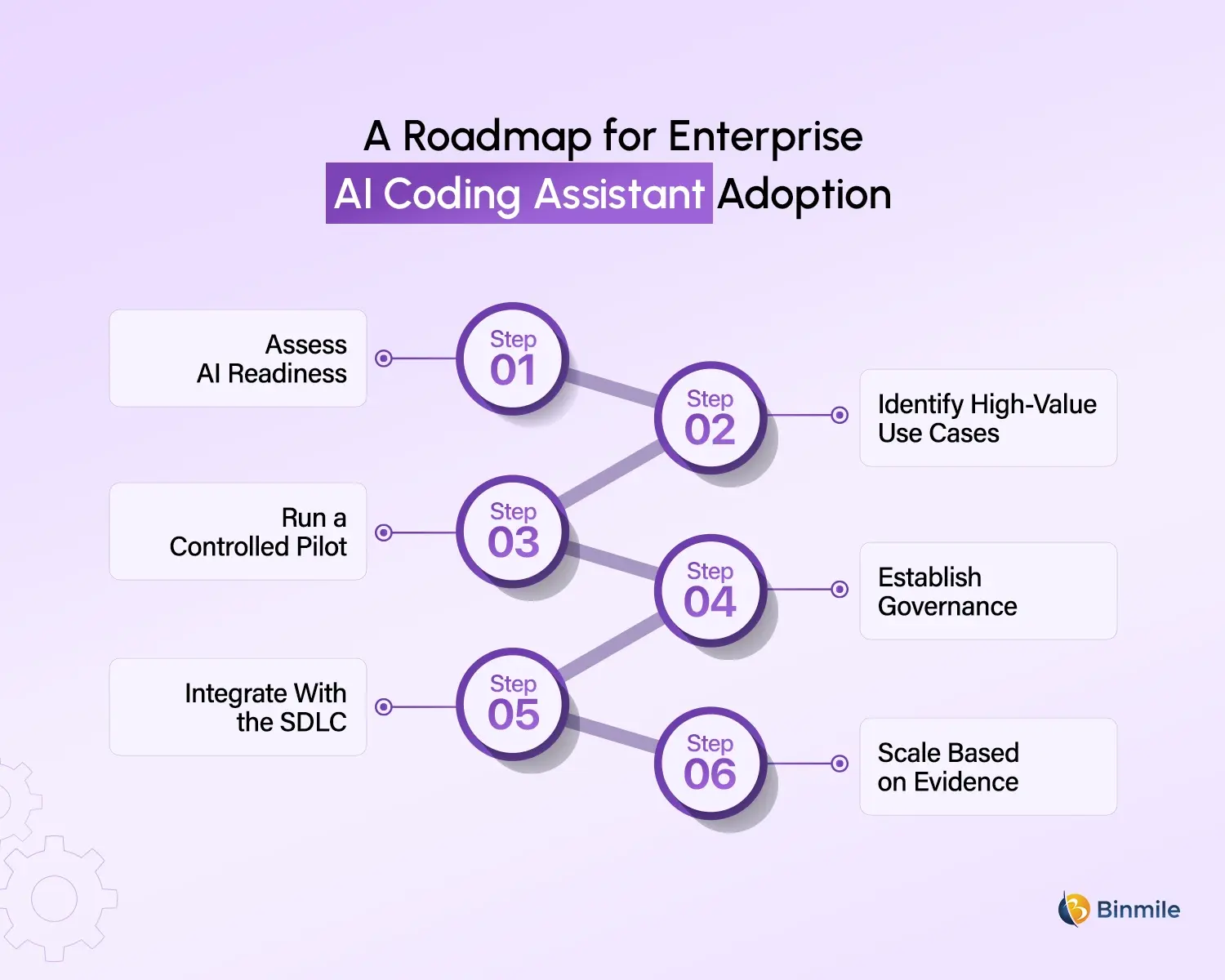
Step 2: Identify High-Value Use Cases
Start with activities that are repetitive, measurable, and relatively low risk.
Examples include test generation, documentation, code explanation, boilerplate generation, and legacy code analysis.
Step 3: Run a Controlled Pilot
Select a representative development team and establish baseline metrics before introducing the tool. Once implemented, measure its impact across key areas such as development cycle time, pull request turnaround time, test coverage, defect rates, developer satisfaction, code review effort, and the amount of time developers spend on repetitive tasks.
This provides a clearer picture of whether the AI coding assistant is actually improving engineering productivity and software quality.
Step 4: Establish Governance
Define acceptable use policies, data handling requirements, human review standards, security checks, and ownership responsibilities.
Step 5: Integrate With the SDLC
AI should become part of the existing development workflow rather than another disconnected application.
Integration with source control, CI/CD, testing, security, and project management systems can make adoption more useful and measurable.
Step 6: Scale Based on Evidence
Once the pilot demonstrates measurable value, expand to additional teams and use cases.
This approach makes AI adoption a business decision backed by evidence rather than a technology purchase driven by market excitement.
AI Coding Assistant Tools: When to Buy and When to Build
The AI coding assistant market includes tools such as GitHub Copilot, Cursor, Amazon Q Developer, Gemini Code Assist, Claude Code, Replit, and IBM watsonx Code Assistant, offering capabilities ranging from code completion and generation to debugging, testing, code review, and agent-based development. For most development teams, these off-the-shelf AI coding tools can provide a practical starting point without the time and cost involved in building a solution from scratch.
However, enterprises with proprietary systems, private repositories, specialized workflows, internal coding standards, or strict governance requirements may need a more customized approach. A custom AI coding solution can be designed to understand internal APIs, architecture guidelines, documentation, security policies, and approved coding practices while integrating directly into existing development environments. The decision ultimately comes down to the use case: buying is generally more practical for standard development needs, while building or customizing becomes more valuable when proprietary context, deeper workflow integration, or specialized controls are critical to the business.
Looking to bring AI into your software development workflow without compromising quality, security, or control?
The Future of AI-Assisted Software Development
The next stage of AI-assisted coding is likely to be less about autocomplete and more about task-level collaboration. Developers will increasingly describe an objective, provide constraints, review a proposed plan, and supervise AI as it works across files, tests, documentation, and development tools. This does not make traditional engineering obsolete. It raises the importance of engineering judgment.
Organizations that benefit most from AI will not necessarily be those that generate the most code. They will be the ones who create the right operating model around AI, combining capable AI coding tools with strong engineering practices, security controls, governance, and measurable business outcomes.
How Binmile Can Help Organizations Adopt AI Coding Assistants
For organizations evaluating AI coding adoption, the starting point should be the engineering problem rather than the tool itself. Binmile can help businesses assess their existing development environment, identify practical AI use cases, integrate AI capabilities into established workflows, and design an adoption roadmap aligned with business and technology priorities.
The same approach can extend beyond developer productivity. Organizations can explore AI-assisted software development for application modernization, testing, automation, engineering knowledge management, and custom software development services initiatives while keeping security, governance, scalability, and human oversight in the process.
The objective is not to introduce AI for the sake of introducing another development tool. It is to build an engineering environment where AI takes care of more repetitive work, developers can focus on higher-value decisions, and technology teams can deliver software with greater speed, consistency, and control.
Frequently Asked Questions
AI Coding Assistants use artificial intelligence to help developers generate, complete, explain, test, debug, and refactor code. They can reduce repetitive work while helping developers navigate complex codebases and accelerate different stages of software development.
Enterprises can use AI Coding Assistants to improve developer productivity, accelerate delivery, support testing, simplify legacy code maintenance, improve documentation, and reduce repetitive engineering work while allowing developers to focus on architecture and complex problem-solving.
Yes, provided they are introduced with appropriate security, governance, access controls, testing, and human review. Enterprise adoption should also consider repository size, development environments, regulatory requirements, integration needs, and the organization’s existing software engineering processes.
Businesses should evaluate code quality, security, data privacy, integration capabilities, developer experience, governance controls, scalability, licensing, and total cost of ownership. They should also identify measurable use cases and establish performance benchmarks before large-scale adoption.
AI Coding Assistants can automate parts of development but cannot fully replace software developers, particularly for complex enterprise systems. Developers remain responsible for architecture, business logic, security, validation, system decisions, and reviewing AI-generated output before it reaches production.
An AI development company can assess AI readiness, identify suitable use cases, evaluate tools, integrate AI into development workflows, establish governance practices, run controlled pilots, and create an adoption roadmap aligned with security, engineering, and business objectives.