A growing enterprise can easily end up managing thousands of images, videos, product files, presentations, design files, documents, and brand assets across shared drives, cloud folders, email threads, and individual devices. The result is familiar: people spend too much time searching for files, teams recreate assets that already exist, and outdated versions continue to circulate. This is one reason the digital asset management market is expanding rapidly. According to Grand View Research, the global market was valued at USD 4.2 billion in 2023 and is projected to reach USD 11.9 billion by 2030, growing at a CAGR of 16%.
But adopting Digital Asset Management systems is not simply about putting files into a better folder. A well-designed DAM system creates a structured environment where digital assets can be stored, found, reviewed, approved, shared, updated, and retired with greater control. This article explores how DAM reduces operational costs, improves collaboration across teams, what capabilities businesses should look for, how it integrates with existing applications, and what organizations should consider before starting digital asset management implementation.
What Is Digital Asset Management and Why Does It Matter?
Digital Asset Management, commonly called DAM, is a centralized approach to organizing and managing an organization’s digital content throughout its lifecycle. Instead of searching through folders or asking colleagues for files, employees can use metadata, keywords, categories, and other attributes to quickly find the right asset. A DAM strategy can also manage versions, permissions, approvals, expiry dates, and related assets from one place.
A modern digital asset management platform can manage product images and videos, marketing campaigns, brand assets, sales materials, social media content, product documentation, packaging, and other creative files. By bringing these assets together, DAM makes them easier to find, reuse, share, and manage across teams.
For example, a marketing team can create a campaign asset, send it for approval, make revisions, publish it across channels, and eventually archive it. A DAM platform supports this entire lifecycle instead of treating the asset as just another file in a folder.
Why Traditional File Management Becomes Expensive
Poorly managed digital assets create hidden costs through wasted search time, duplicate work, outdated files, and repeated requests. When these small inefficiencies occur across hundreds of employees and multiple teams, they can quickly become a significant operational expense.
There are four common sources of this hidden cost:
-
Duplicate Asset Creation
When teams cannot find existing assets, they often recreate them. This consumes design, marketing, content, and agency resources that could have been used for higher-value work.
-
Time Spent Searching
Employees may search email, messaging platforms, cloud migration, shared drives, or ask colleagues for files. DAM reduces this friction by providing a structured and searchable asset repository.
-
Version Confusion
Multiple versions of the same asset can create unnecessary review cycles and, more seriously, cause teams to publish outdated or incorrect content.
-
Uncontrolled Asset Usage
Some digital assets have licensing restrictions, expiration dates, or specific usage conditions. Without centralized visibility, businesses can struggle to track where and how assets are being used.
This is where DAM technology moves beyond simple storage. It introduces structure, governance, search, workflow, and visibility into the asset lifecycle.
How Digital Asset Management Systems Reduce Business Costs
The strongest business case for DAM is not “we can store our files in one place.” The stronger argument is that a DAM system can reduce the amount of repetitive work surrounding those files.
1. Reduce Asset Duplication
A centralized library helps teams find and reuse existing content instead of creating similar assets from scratch. This can reduce unnecessary design and production costs, especially for organizations operating across multiple regions.

2. Reduce Employee Search Time
Advanced search, metadata, tags, and filters help employees find assets faster. Modern digital asset management tools may also use AI-powered tagging and visual search, reducing the time teams spend hunting for files.
3. Improve Version Control
DAM software keeps asset versions organized and helps teams identify approved files. This reduces the risk of using outdated content and supports better brand consistency and compliance.
4. Reduce Unnecessary Production Cycles
Teams can reuse approved assets and access the right formats or variations without repeatedly involving designers. This shortens production cycles and frees creative teams for higher-value work.
5. Control Access and Usage
Role-based permissions allow businesses to control who can view, edit, download, approve, or share specific assets. This improves governance and reduces the risk of unauthorized or incorrect asset usage.
How DAM Systems Improve Collaboration Across Enterprise Teams
Collaboration becomes difficult when digital assets are scattered across teams and platforms. Marketing may create campaign creatives, sales may need them for presentations, product teams may require images, while legal needs to review and approve content.
A DAM system creates a shared source of truth where authorized teams can access, review, approve, and reuse the same assets. This reduces email chains, repeated requests, and version confusion, making collaboration faster across departments, locations, and time zones.
Collaboration improves when teams have:
| Collaboration Challenge | DAM-enabled Approach | Business Impact |
|---|---|---|
| Multiple asset locations | Centralized repository | Less searching |
| Unclear latest version | Version management | Fewer errors |
| Repeated approval requests | Workflow and approval controls | Faster reviews |
| Different teams are using different files | Shared asset library | Greater consistency |
| Difficult asset discovery | Metadata and search | Faster execution |
| External agency coordination | Controlled asset access | Easier collaboration |
The result is not simply better file management. It is a smoother content operation.
Digital Asset Management Process: From Creation to Retirement
A mature digital asset management process typically follows the asset throughout its lifecycle.
Create → Upload → Tag → Review → Approve → Distribute → Reuse → Monitor → Archive
Each stage has a role.
During creation, teams produce the original content. Once uploaded, metadata and classification make the asset easier to discover. Review and approval workflows help ensure that only suitable content reaches users. Distribution makes approved assets available to relevant teams and channels.
Later, the organization can monitor usage and identify assets that are outdated, duplicated, or approaching expiration. Those assets can then be archived or removed.
This lifecycle approach prevents the DAM repository from becoming another digital dumping ground.
What Features Should Businesses Look for in Digital Asset Management Software?
Not every DAM software product will suit every enterprise. The right choice depends on asset volume, users, workflows, existing technology, security requirements, and business objectives.
Key capabilities to evaluate include:
-
Centralized Asset Library
A single, organized repository helps teams store, access, and manage approved digital content without relying on scattered folders or shared drives.
-
Advanced Search
Metadata, tags, filters, categories, and AI-powered search can help employees quickly find the right asset, even within large content libraries.
-
Version Control
Teams can track asset history, identify the latest approved version, and reduce the risk of using outdated content.
-
Workflow Management
Built-in workflows can streamline content review, approval, publishing, and collaboration while reducing manual follow-ups.
-
Access Control
Role-based permissions allow businesses to control who can view, edit, download, approve, or share specific assets.
-
Metadata Management
Structured metadata makes assets easier to classify, search, filter, and manage throughout their lifecycle.
-
Asset Lifecycle Management
Features for expiration, archival, and retirement help organizations keep their libraries current and prevent outdated assets from being used.
-
Analytics
Usage and download insights can show which assets are being used, helping teams identify valuable content and improve content management decisions.
-
Integration Capabilities
APIs and connectors allow DAM systems to integrate with CMS, CRM, PIM, eCommerce, and other enterprise applications, reducing duplicate uploads and disconnected workflows.
-
Scalability
The DAM platform should be able to support growing asset volumes, users, departments, regions, and business requirements without becoming difficult to manage.
The most expensive mistake is choosing a DAM based only on its interface. An attractive platform that cannot fit into the existing technology environment can create another silo instead of eliminating one.
Ready to reduce asset-related costs and help teams collaborate faster with a smarter DAM strategy?

Can DAM Systems Integrate With Existing Business Applications?
Yes. Integration is one of the most important considerations when selecting a DAM platform.
A Digital Asset Management system may need to exchange information with content management systems, eCommerce platforms, CRM applications, marketing automation tools, product information management systems, cloud storage, enterprise resource planning platforms, and other business applications. API Integration can help connect these systems so teams do not have to manually move assets between platforms.
For example, product information stored in a PIM system can be connected with product images and videos stored in a DAM. A CMS can retrieve approved assets from the DAM rather than requiring content teams to upload duplicate copies.
This approach makes DAM part of the enterprise technology ecosystem rather than another standalone application. Organizations with complex environments may benefit from Software Integration Services to assess existing systems, identify integration dependencies, design APIs, and establish secure data flows.
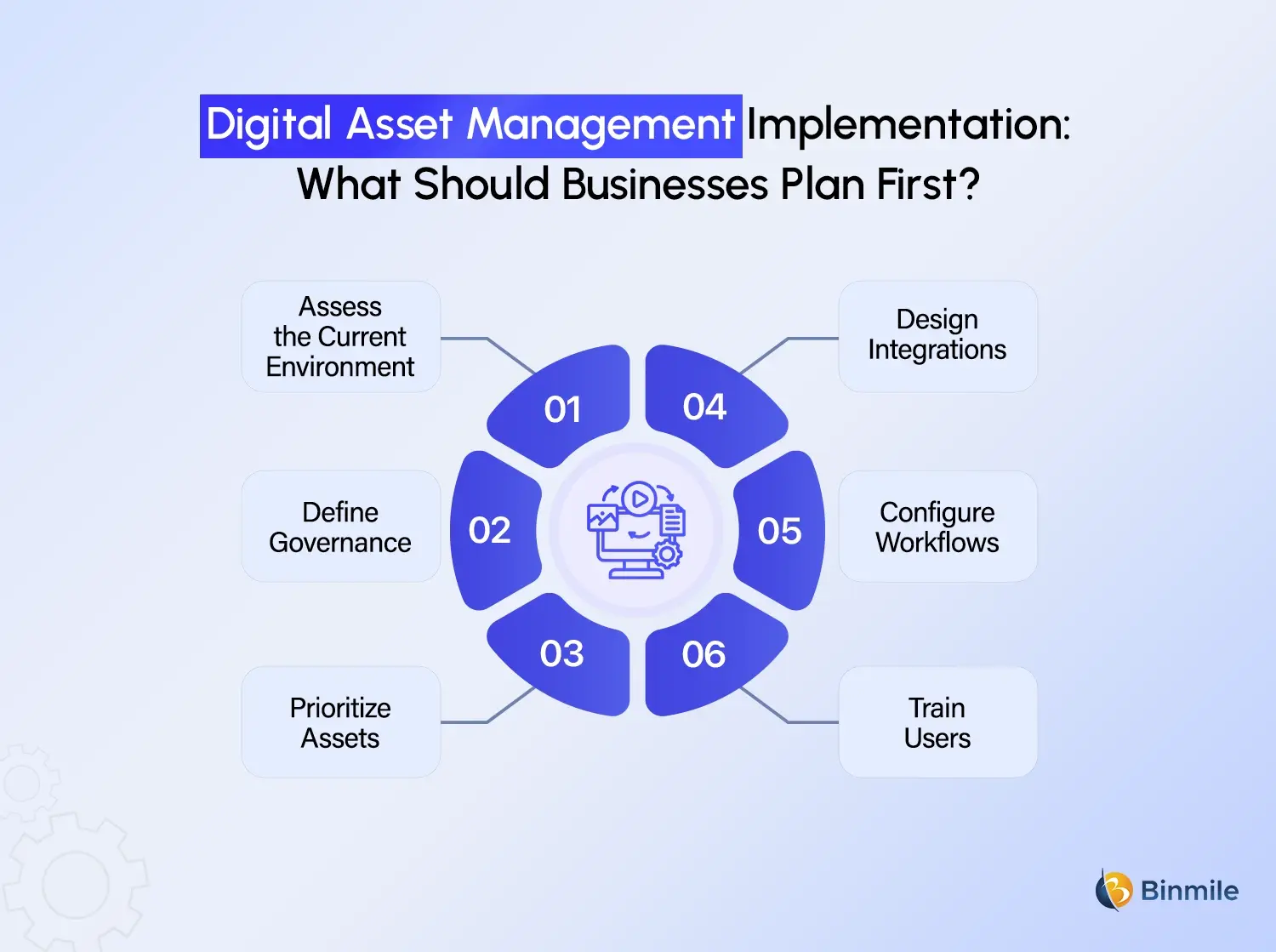
What to Consider Before Starting Digital Asset Management Implementation
Before choosing among DAM tools, organizations should understand how digital assets are currently created, stored, approved, distributed, and retired.
A practical implementation approach includes:
-
Assess the Current Environment
Identify repositories, asset types, users, workflows, integrations, and major pain points.
-
Define Governance
Establish naming conventions, metadata standards, permissions, ownership, approval rules, and lifecycle policies.
-
Prioritize Assets
Not every historical file needs to move into the new DAM. Prioritize valuable, frequently used, current, and business-critical assets.
-
Design Integrations
Determine which enterprise applications need to exchange assets or metadata with the DAM.
-
Configure Workflows
Build approval, review, publishing, and archival workflows around actual business processes.
-
Train Users
Even the best DAM solution will underperform if employees continue storing assets in personal folders or unofficial repositories.
This is where application modernization can also become relevant. If DAM adoption exposes outdated applications or fragmented workflows, organizations can modernize surrounding systems rather than forcing a new platform into an old architecture.
How DAM Fits Into Enterprise Digital Transformation
DAM is more than a marketing technology. A digital asset management platform can connect content with PIM, CMS, CRM, eCommerce, and marketing automation systems, making it a valuable part of Enterprise Digital Transformation and a broader Digital Transformation Roadmap.
As asset volumes and teams grow, DAM becomes especially useful when employees struggle to find files, recreate existing content, manage outdated versions, or maintain separate libraries. In specialized industries, it can also work with Digital Twin Software to organize product models, engineering visuals, and technical documentation.
The real trigger is not the number of assets, but how difficult they have become to manage, find, and use efficiently.
Need to bring scattered digital assets into one connected, searchable, and scalable ecosystem?
How Binmile Can Help With Digital Asset Management
A successful DAM implementation involves more than selecting a platform. It requires the right architecture, integrations, migration strategy, security, workflows, governance, and user adoption. Binmile can help organizations assess their existing technology environment, define the right DAM approach, connect it with business applications, and plan migration and modernization around their operational needs.
From Software Integration Services, API Integration, and Cloud Consulting to Application Modernization and Custom Software Development Services, the focus is on building a connected DAM ecosystem rather than adding another standalone application. This helps enterprises turn scattered digital content into a structured, accessible, and reusable resource that supports faster collaboration and more efficient operations.
Frequently Asked Questions
Digital Asset Management systems centralize digital files such as images, videos, documents, and creative content. They use metadata, search, permissions, workflows, and version control to help teams organize, find, manage, approve, and distribute assets efficiently.
They reduce costs by minimizing duplicate asset creation, shortening search time, improving reuse, reducing version-related errors, and streamlining approval workflows. They can also help organizations manage licensing, permissions, and asset expiration more effectively.
DAM systems give authorized teams access to a shared source of approved digital assets. Marketing, sales, design, product, regional teams, and external partners can work from consistent content while reducing email-based file sharing and repeated requests.
Businesses should evaluate search, metadata management, version control, permissions, approval workflows, asset lifecycle management, analytics, scalability, security, and integration capabilities. The platform should also fit existing workflows and enterprise architecture.
Yes. DAM systems can integrate with CMS, CRM, PIM, eCommerce, marketing automation, ERP, cloud storage, and other applications through APIs, connectors, or integration platforms. This helps eliminate duplicate uploads and creates more connected content workflows.
A technology partner can assess existing systems, define DAM architecture, select suitable technology, plan migration, design integrations, configure workflows, establish governance, and support adoption. This helps organizations implement DAM around business requirements rather than software features alone.