
The world around us is increasingly becoming more digitized, and so are the security concerns they bring up with it brings up. Businesses, especially financial services providers, are more prone to online threats and attacks. Thus, they require a proactive approach that harnesses cutting-edge solutions to meet the ever-growing demands of security, efficiency, and customer engagement. Facial recognition technology is one such tool that can address these needs. However, facial recognition apps or detection apps are more than just for your device or for social media interactions. From enhancing security measures to personalizing customer experiences, face detection apps are transforming the way businesses operate and engage with customers.
Whether you run a small startup or manage a large enterprise, an app with face recognition can help your business stay competitive and offer more personalized services to your customers. However, building a facial recognition software app requires careful planning and attention to detail. So, if you are also wondering about AI facial recognition solutions, this blog is for you. In this blog, we will discuss what facial recognition technology is, how it works, and what its challenges are. In addition, we will also delve into 7 key steps to develop apps for facial recognition that deliver value while protecting user privacy and meeting legal requirements.
Facial Recognition Usage And Growth: Market Research
The global facial recognition market is projected to reach $8.83 billion by 2025, with an expected CAGR of 15.5% through 2032. In the United States alone, approximately 176 million people use facial recognition technology, with 131 million utilizing it on a daily basis. The technology is now widely adopted by 70% of governments worldwide for various applications ranging from law enforcement to identity verification.
As of 2025, 68% of users rely on facial recognition to unlock personal devices such as smartphones and laptops. Additionally, 51% use it to access mobile applications, including healthcare portals and ticketing platforms, while 42% leverage facial recognition for secure access to banking and other financial services.
Globally, facial recognition has been integrated into 40% of workplace environments, and is in use across public transportation systems in 20% of countries, highlighting its growing role in digital identity and access management.
What is Facial Recognition and Detection?
Facial recognition is a way of identifying a human face through a technology known as biometrics, often times mapping facial features from a photograph or video and then comparing the information with a database of known faces to find a match. When you are building face scanning software, you rely a lot on biometrics (it uses unique facial features to identify individuals and involves capturing and analyzing facial characteristics such as the distance between eyes, the shape of the nose, and the contours of the face, among others), typically through AI, to identify human faces.
How to Build Facial Recognition And Detection Apps: Step-by-Step Guide
So far, we have understood the intricacies of facial recognition technology and how it works. Let’s move on to discussing the step-by-step process to create face recognition software for mobile users.
1. Define Scope and Target App Users
To build the best software for face recognition, it is essential to set up the core objective of your facial recognition app. Try to find answers to: What specific problem does it aim to solve? Is it intended for security purposes, attendance tracking, healthcare applications, or another domain? Establishing a well-defined scope helps to outline specific features and guide the selection of appropriate technologies, ensuring a focused and efficient development process.
Furthermore, understanding the intended target audience is crucial. This involves identifying their specific needs, preferences, and technological expertise. Doing so helps you understand these factors; you can tailor the app’s design, features, and user experience to effectively meet their requirements and expectations.
2. Acquire and Prepare High-Quality Data
To run a successful face scanning app, you need to ensure the quality and quantity of the training data are premium. It can be done by collecting a diverse and comprehensive dataset that encompasses a wide range of variations, such as images of people of different ages, genders, ethnicities, and facial expressions under various lighting conditions and poses. Data preprocessing is a critical step that involves techniques such as normalization, resizing, and noise reduction to enhance data quality and improve model training efficiency.
Additionally, meticulous data annotation is required, involving the precise labeling of faces and key facial landmarks such as eyes, nose, and mouth. To further augment the dataset and improve model performance, techniques such as rotation, flipping, and scaling can be employed to increase its size and diversity. This diversity and data preprocessing are crucial not only for enhancing the model’s robustness but also for ensuring accurate performance across diverse user populations.
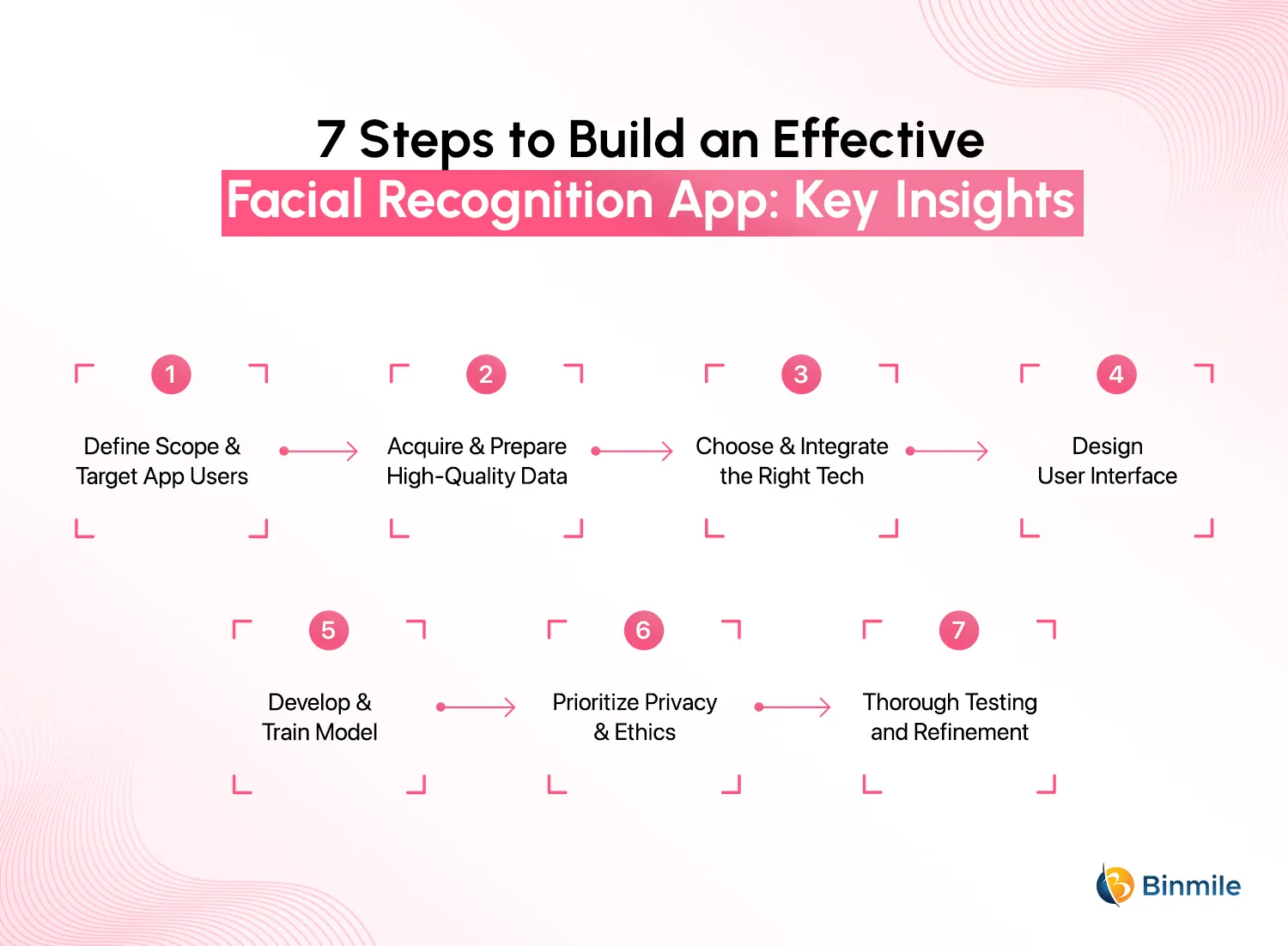
3. Choose and Integrate the Right Tech
Selecting the appropriate technology stack is paramount for AI-powered software for face recognition. This involves carefully considering and opting for the most suitable tools and frameworks. Try deep learning frameworks such as TensorFlow, PyTorch, or Keras, which are essential for building and training the core facial recognition models. Additionally, computer vision libraries like OpenCV provide valuable tools for image and video processing tasks, including face detection, feature extraction, and tracking.
You can also utilize software development tools, such as Amazon Rekognition, a reputed API solution for image and video recognition that offers a robust infrastructure, as they offer pre-built AI/ML services and cost-effective solutions for training, deploying, and scaling your models. Additionally, sign up for a bulk SMS solution to send push notifications to your app users.
Depending on the use case, face recognition systems can be deployed using:
- Mobile SDKs (Google ML Kit, Apple Vision)
- Cloud APIs (AWS Rekognition, Microsoft Azure Face API)
- On-device models for privacy and low-latency scenarios
- Frameworks like TensorFlow, PyTorch, OpenCV, and Dlib
4. Design User Interface
It is a user-friendly interface is crucial for the widespread adoption and success of any application. Prioritize user experience (UX) by ensuring that the app is intuitive and easy to navigate, even for users who may not be familiar with facial recognition technology. Design an aesthetically pleasing and visually appealing user interface (UI) that enhances the overall user experience and creates a positive impression.
Integrate key functionalities such as face detection, face matching, and real-time processing into the application. Conduct rigorous testing to ensure accuracy under various conditions, such as poor lighting, occlusions, or extreme facial expressions. Address any biases in the model during this phase to ensure fairness and equity.
5. Develop and Train Model
It is essential to select a suitable face detection model architecture, such as convolutional neural networks (CNNs), based on the specific requirements and complexity of the task at hand. Teams must rigorously train the chosen model on the prepared dataset using appropriate optimization algorithms and hyperparameter tuning techniques. They do this to prevent overfitting and improve the model’s generalization capabilities. This process ensures the model learns the provided inputs and delivers the expected representation.
Moreover, teams should not stop at training models alone. They must regularly monitor and optimize the models to improve accuracy and efficiency. Teams should also explore techniques like transfer learning to leverage pre-trained models and accelerate the training process.
6. Prioritize Privacy and Ethics
It is crucial to address the ethical and privacy implications associated with facial recognition technology and be transparent with users about how their facial data is collected, used, and stored. Consider the potential biases in facial recognition models and strive to mitigate them to ensure fair and equitable treatment for all users. Be mindful of the ethical implications of facial recognition technology and its potential impact on individual privacy and societal issues.
Implement robust security measures such as encryption protocols to protect user data from unauthorized access or breaches. Ensure compliance with relevant data privacy regulations, such as GDPR and CCPA. This is to ensure that your face scanning apps not only adhere to standard compliance but also respect the privacy and security of your users and their data.
7. Thorough Testing and Refinement
Rigorous testing is essential to identify and address any potential bugs, performance issues, or areas for improvement. Testing should be conducted across various devices and operating systems, and under different conditions to ensure the app’s robustness and reliability. Later, gather user feedback and conduct iterative improvement and refinement of the app based on real-world usage and user preferences.
Regular updates and refinements are crucial to ensure the app remains competitive, addresses emerging issues, and provides the best possible user experience. Remember, you need to continuously work on the efficiency of your app, not only to ensure your facial detection app is high-performing but also to meet users’ expectations and enhance their experiences.
Leverage AI to create a facial detection app to enhance accuracy and streamline identity verification processes.

How Does the Face Recognition and Detection App Work?
The successful implementation of a face recognition or face detection app requires a clear understanding of its underlying workflow. An app with face recognition detects facial features called facial signatures (users’ eyes’ precise location, scars, or other facial differences) from a photograph or video and then compares the information stored in a database of known faces to find an accurate match. However, facial technology or face recognition apps do not rely on a massive database of photos to establish an individual’s identity.
What it does is that it simply identifies and recognizes one person as the sole owner of a particular device while limiting access to others. In addition, at its essence, facial recognition technology leverages computer vision, a domain within AI that focuses on training machines to understand and interpret visual information much like humans do. Sometimes, these systems may also calculate an accuracy score or provide alternatives.
Let’s understand the complete breakdown of the core stages involved in building such systems.
1. Face Detection
The system captures visual data from live video or images, then preprocesses it (resizing, normalization, color adjustment) for better model performance. In this stage, the system identifies the presence and location of one or more human faces within the input frame. Face detection algorithms such as Haar Cascades, HOG + SVM, or deep learning-based detectors like MTCNN and SSD (Single Shot Multibox Detector) are commonly used. The output of this phase is a bounding box around each detected face. The effectiveness of the detection algorithm is critical, as inaccuracies here directly impact all downstream tasks such as alignment and recognition.
2. Face Alignment
Detected faces are then geometrically aligned to a standard orientation. This step ensures that facial features such as eyes, nose, and mouth are in consistent positions across different input samples. Face alignment typically relies on facial landmark detection and affine transformation techniques.
This normalization is essential for achieving high accuracy in the subsequent feature extraction and comparison stages, as it mitigates variability due to head tilt, lighting, or expression.
3. Feature Extraction
Once aligned, each face is processed through a deep convolutional neural network (CNN) that transforms the image into a compact and discriminative embedding, a vector representation of the face.
Pre-trained models commonly used for this task include:
- FaceNet
- VGGFace
- DeepFace
- ArcFace
- Dlib ResNet
These embeddings capture the unique geometric and textural patterns of a face, allowing for robust comparison against other face vectors.
4. Face Recognition and Matching
Face recognition involves comparing the extracted embedding with stored embeddings in a database to determine identity. Two modes of recognition are typically supported:
- 1:1 Face Verification: Confirms if the input face matches a claimed identity.
- 1:N Face Identification: Determines who the person is from a set of known identities.
The comparison is performed using similarity metrics such as cosine similarity or Euclidean distance. A confidence threshold is applied to determine match validity.
5. Decision and Application Response
Once the face matching process is complete, the system interprets the similarity score to confirm or reject identity. Based on this result, the application executes a predefined action such as:
- Grant or deny access
- Authenticate a user
- Log attendance
- Trigger a security alert
This step bridges recognition with real-world application outcomes and typically involves UI feedback or integration with access control, user authentication, or notification systems. Proper threshold calibration is critical to ensure a balance between accuracy and security.
How Much Does It Cost to Build a Face Recognition and Detection App?
Every app is unique. Therefore, it is difficult to give an exact estimation for any app. However, we have estimated face scanning software development costs based on several factors. The app development cost for face detection apps depends on various factors, such as app features, tech stack used, and complexities of UI/UX design, which also impact the custom mobile app development cost. So, the cost of a face detection app can be between $30,000 and $1,00,000 or more to develop a facial recognition app.
| Development Area | Estimated Cost (USD) | What Is Included |
|---|---|---|
| UI/UX Design | $3,000 – $8,000 | Wireframes, user journey design, and interface layout for mobile/web platforms. |
| Frontend Development | $5,000 – $12,000 | iOS/Android or cross-platform development using React Native, Flutter, etc. |
| Backend Development | $8,000 – $18,000 | APIs, server-side logic, database setup, authentication, scalability. |
| Facial Recognition Integration | $10,000 – $25,000 | AI/ML model development or integration (OpenCV, AWS Rekognition, Face++, etc.). |
| Cloud and Infrastructure | $2,000 – $6,000 | Storage, data processing, deployment (AWS, Azure, GCP). |
| Security and Compliance | $2,000 – $5,000 | Data encryption, GDPR/CCPA compliance, and user privacy features. |
| Quality Assurance and Testing | $2,000 – $5,000 | Manual and automated testing for performance, bugs, and security vulnerabilities. |
| Admin Dashboard (Optional) | $2,000 – $6,000 | Web panel for user/app management, analytics, and system logs. |
| Ongoing Maintenance (Yearly) | $5,000 – $10,000 | Updates, cloud costs, bug fixes, and performance optimization. |
Key Technologies Behind Face Recognition and Detection App Development
Businesses intending to use facial recognition technology must understand that, at its core, the technology discerns and identifies individual faces from digital images and videos. It is a complex process that involves stages from detecting a face, analyzing its key features, extracting these features to create a faceprint, and finally comparing it against a facial database for recognition.

Certain technologies make this process quicker, simpler, and more accurate. So, let’s understand how they come together to help you run your face scanning app smoothly and effectively:
-
AI and ML
These technologies enable face detection, feature extraction, and recognition through deep learning algorithms. They empower systems to learn from vast datasets and improve accuracy over time. They also identify unique facial features and match them against a database, making recognition faster and more accurate.
-
Computer Vision
Computer vision analyzes images to detect and map facial features and interpret visual data from the environment, enabling real-time facial recognition. This is crucial for applications requiring high-speed and reliable detection.
-
3D Facial Recognition Technology
This technology captures and analyzes facial geometry for enhanced accuracy. It creates a 3D map of the face to identify features that are difficult to alter, such as eye socket contours and nose shape, making systems more resistant to spoofing or deepfakes.
-
Neural Networks
Convolutional Neural Networks (CNNs) recognize patterns from millions of labeled data points and perform advanced pattern recognition and feature extraction. They mimic human brain processing and are highly effective at identifying facial features.
-
Infrared Technology
Infrared enables low-light or nighttime facial recognition by capturing heat signatures, making it essential for 24/7 security applications.
-
Edge Computing
Edge computing enables real-time processing directly on devices instead of sending data to central servers. This reduces latency and improves response time, especially for instant actions like unlocking smartphones.
Top Use Cases of Facial Recognition Apps and Technology With Real-World Examples
-
Security and Surveillance
Airports like Dubai International use facial recognition to enhance security and streamline passenger processing.
-
Access Control
Apple Park uses facial recognition for secure employee access to buildings and restricted areas.
-
Customer Service and Engagement
Caliburger uses facial recognition to identify repeat customers and offer personalized experiences.
-
Healthcare
The Cleveland Clinic uses facial recognition to ensure accurate patient identification and streamline check-ins.
-
Financial Services
HSBC uses face recognition to verify customer identities for online banking.
-
Retail and Marketing
Walmart uses facial recognition systems to monitor customer satisfaction and prevent theft.
Build a face recognition app that integrates seamlessly with your existing systems and delivers precision & scalability for your business.

Conclusion
The way mobile app development companies use facial recognition applications has changed dramatically. Businesses use them to improve security, automate identity verification processes, and deliver a better customer experience. As artificial intelligence and computer vision technology grow, the capabilities of these solutions will only get better and more effective throughout all types of businesses.
At the same time, businesses must find a way to develop facial recognition systems that are reliable and trustworthy while complying with guidelines for privacy and security, as well as incorporating ethical AI practices.
Frequently Asked Questions
When built with proper encryption, compliance with privacy regulations (like GDPR), and secure storage of facial data, a face matching app can be safe for sensitive data verification. It is crucial to implement strong data protection measures and provide transparency to users.
Building a face identify app requires tools for face detection, facial feature extraction, machine learning models for identification, a secure database to store facial templates, and a user-friendly interface. Popular technologies include OpenCV, TensorFlow, and cloud-based solutions like Microsoft Azure Face API or AWS Rekognition.
Advanced face identify apps can operate in low light and crowded environments using high-accuracy algorithms, infrared cameras, and proper preprocessing of images. However, performance may vary depending on the hardware and algorithm sophistication.
Most face recognition apps use a mix of:
-
Computer vision libraries (like OpenCV)
-
Machine learning frameworks (like TensorFlow)
-
Mobile development tools (Android, iOS, or cross-platform)
-
Cloud services (such as AWS Rekognition or Google ML Kit)
Yes, modern tools like Google ML Kit and TensorFlow allow real-time face recognition directly on smartphones without needing heavy servers.