In simple words, cross-browser testing examines your website or application in multiple browsers, ensuring its smooth and consistent functionality without any quality compromise or dependencies. Applicable to mobile and web apps, cross-browser testing is ideal for customer-facing apps. Every enterprise wants to enhance its efficiency and user experience by knowing what is wrong, what needs to be fixed, and what common pitfalls are. With manual and automated testing methods, browser testers execute and script test cases on different browsers. When it comes to cross-browser testing, there are lots of testing tools that make testing tasks easy. These tools offer a steady behavior and experience across all platforms, browsers, and devices. Have a look at the following statistics to know more about essential cross-browser software testing tools.
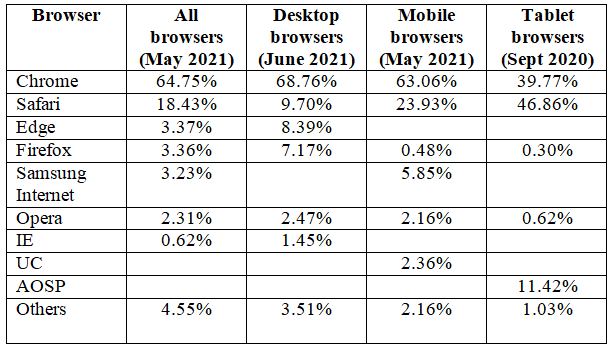
According to global web stats from web traffic analysis website StatCounter for 2020-21, the following is the usage share of web browsers, including desktop, tablet, and mobile. People are using desktop, tablet, and mobile products at an unprecedented rate. That is why it is essential to get an app or web product free from all sorts of glitches.
Unique Cross-Browser Software Testing Tools
A cross-browser testing tool lets testers identify code validation, performance, responsive design, UI inconsistencies, and strange behavior of apps. From security bugs to UI bugs to accessibility issues, there are several issues that a testing tool can solve. Find here the most popular and proven cross-browser software testing tools that help with cross-browser testing of your site.
-
LambdaTest
LambdaTest is a cloud-based software platform for cross-browser compatibility testing of your web app or website. It lets you perform live interactive testing on real browser environments. The tool is an online Selenium grid allowing you to run your test scripts on 2000+ browser environments.
Features:
- Automated browser tests on online Selenium grid
- Automated cross-browser testing across 2000+ browsers
- Integrated debugging and geolocation testing
- Locally hosted web testing and end-to-end Cypress testing in the cloud
- Auto-generation of full-page screenshots of web pages
- Deliver websites faster with LT Browser
Plan – Free + paid
Free Offer – 60 minutes of Live interactive testing every month FREE!!
Official link – https://www.lambdatest.com/
-
Selenium
It is a superb enterprise Selenium Grid preferred by testers as a cross-browser and mobile testing infrastructure. Selenium successfully runs entirely in-house or in your private cloud. Selenium Box is a maintenance-free solution that manages Selenium updates and browsers.
Features:
- Support for Chrome, Firefox, Internet Explorer, Safari, and Edge browsers
- Supports OpenFin, an operating system for finance
- Supports desktop browsers, mobile emulators, and real mobile devices
Plan – Free + paid
Offer – Check website
Official link – https://seleniumbox.com/
Know the Difference: Selenium vs Cypress vs Playwright
-
SauceLabs
It is the world’s largest cloud-based test platform for live, automated, and continuous web and mobile apps. It is the only cloud-based testing platform that delivers real device support for updated browsers, operating systems, mobile emulators, simulators, etc.
Features:
- Accelerate test run time by up to 10x
- Test on desktop and mobile browser/OS in the cloud
- Scalable for CI/CD
- Single platform for 360° UX
- Enterprise security and support
- Debugging tools and test analytics
- Real-time visibility into test data
Plan – Free + paid
Free Offer – 28 days free trial
Official link – https://saucelabs.com/
-
CrossBrowser Testing
It is a perfect tool for performing cross-browser testing on many browsers. With a simple interface, the tool successfully supports over 2050+ real desktop and mobile browsers. It lets you feel free from the tension of setting up browsers and operating systems.
Features:
- Create and run Selenium tests in your favorite programming languages
- Create automated tests with zero code
- Create full-page screenshots across browsers and devices
- Test behind firewalls or proxies
- Test locally-hosted websites across 2050+ browsers & devices
Plan – Free + paid
Free Offer – 7 days free trial
Official link – https://crossbrowsertesting.com/
-
TestComplete
TestComplete is a functional UI test automation tool for running and creating tests on any web app. This tool helps systematize the browser testing process for browser compatibility checks on diverse configurations and operating systems.
Features:
- Parallel run tests across 2000+ real environments
- Run tests without any setup or configuration
- Get real-time access to the latest devices
Plan – Free + paid
Free Offer – Yes
Official link – https://smartbear.com/product/testcomplete/overview/
Keep Reading: Software Testing Trends
Conclusion
All mentioned above, cross-browser testing tools give testers an edge while testing the functionality and performance of a web, mobile, and desktop app on a wide range of browsers. Independent QA and software testing companies help app owners test their existing or upcoming apps on various browsers to ensure quality output.
While choosing software automation testing services, ensure you get the following benefits: 24/7 technical support; professional automation QA experts; agile software development from highly experienced testers; fast testing and accurate results; faster cross-platform deployment; rapid feedback; efficient error fixing, etc.
Frequently Asked Questions
Cross-browser software testing tools help teams verify that web applications function and render consistently across different browsers, operating systems, devices, and browser versions.
Businesses should evaluate browser and OS coverage, real-device access, automation support, parallel testing, CI/CD integrations, debugging capabilities, visual testing, and scalability.
Yes. Many modern tools support automated testing frameworks and parallel execution, allowing teams to run tests across multiple browser and device combinations while reducing testing time.
Businesses should consider their browser coverage, application requirements, testing approach, device needs, automation framework, CI/CD workflow, security requirements, and budget before selecting a tool.
A testing partner can define browser coverage, select suitable tools, build automated test suites, integrate testing into CI/CD pipelines, analyze compatibility issues, and improve overall application quality.